
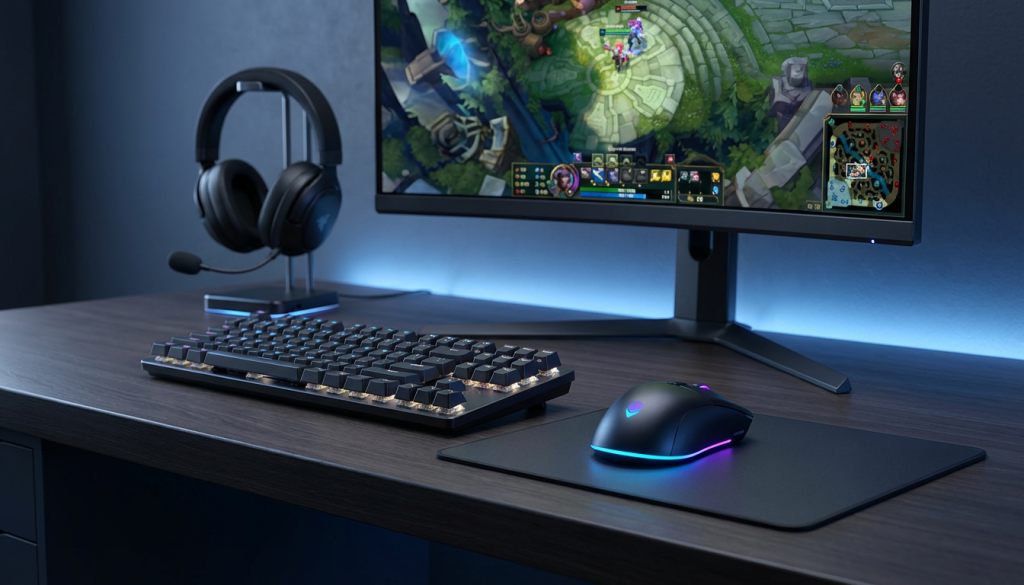
The peripheral market loves selling you overpriced gear with flashy features you’ll never use. After years of testing mice, keyboards, and headsets across competitive and casual gaming, I can tell you most “gaming” labels are pure marketing. The difference between a decent setup and a great one comes down to understanding what actually impacts your gameplay. Smart choices here complement your entire gaming configuration without breaking the bank. Let me show you what’s worth your money and what’s just noise.
Gaming Mice: Where Precision Actually Counts
Your mouse is the most critical peripheral for any genre that requires aiming. I’ve tested everything from 20 dollar office mice to 150 dollar wireless flagships and the differences are real but not where manufacturers want you to think they are.
Sensor Quality Over DPI Numbers
Sensor quality matters more than DPI numbers. Any modern gaming mouse with a PixArt 3370 or similar sensor tracks perfectly up to reasonable DPI ranges. Marketing loves pushing 20000 DPI sensors but nobody plays at those settings. I use 800 DPI for FPS games and 1600 for general use which any decent sensor handles flawlessly.
Higher DPI numbers are pure marketing since game sensitivity multipliers let you achieve any effective sensitivity regardless of base DPI. Focus on sensor consistency and shape comfort over inflated DPI specifications. A 3200 DPI sensor that tracks perfectly beats a 25000 DPI sensor with acceleration issues.
Weight and Ergonomics
Weight dramatically affects how your arm feels during extended gaming sessions. Lighter mice reduce fatigue and enable faster flick shots in FPS games. My current main is a Logitech G Pro X Superlight at 63 grams and the difference from my old 95 gram mouse was immediately noticeable in Valorant. Your arm fatigues less during long sessions and flick shots feel more responsive.
Shape trumps specs every time. A perfectly spec’d mouse that doesn’t fit your grip style will perform worse than a cheaper model that feels natural. Try mice in person if possible or buy from retailers with good return policies. I wasted money on three “perfect on paper” mice before finding one that actually matched my hand size and grip.
Palm grip users need larger mice with pronounced curves while claw and fingertip grippers prefer smaller flatter designs. Your grip style determines which mouse shapes work for you. I use claw grip which works best with medium-sized mice that have a slight hump in the middle.
Wireless Technology Advances
Wireless technology has finally caught up to wired performance. High-end wireless mice from Logitech, Razer, and Glorious have latency indistinguishable from wired connections. The freedom of movement is worth the extra cost if your budget allows. Battery life on modern wireless mice easily lasts 60+ hours between charges.
I was skeptical about wireless for years thinking the latency would hurt competitive play. After testing extensively I can’t detect any difference between my wireless G Pro and wired mice in games like Valorant and CS2. The ability to move freely without cable drag is a genuine quality of life improvement.
Charging becomes the only consideration with wireless. Most mice use USB-C charging which takes 15 minutes for several hours of gameplay. Some support wireless charging pads which is convenient but adds cost. I just plug mine in overnight once a week.
Mechanical Keyboards: Feel Over Features
Mechanical keyboards get marketed with feature lists that sound impressive but rarely impact your actual gaming. RGB lighting, macro keys, and wrist rests are nice-to-haves not must-haves. What matters is switch type and build quality.
Switch Selection for Gaming
Linear switches work best for gaming because they’re smooth and consistent with no tactile bump to slow you down. I prefer Cherry MX Reds or their equivalents for the light actuation force and quiet operation. Clicky switches like Blues sound satisfying but the extra noise and tactile feedback don’t help your performance.
Red switches actuate at 45 grams of force and feel smooth throughout the entire keystroke. They’re quiet enough for shared spaces while still providing the mechanical feel. I’ve used Reds for five years across multiple keyboards and they remain my preferred choice for mixed gaming and typing.
Tactile switches like Cherry MX Browns offer a small bump you feel when the key actuates. This feedback helps with typing accuracy but doesn’t provide meaningful benefits for gaming. Browns work well if you do substantial typing alongside gaming and prefer tactile feedback. The noise level sits between linear and clicky switches.
Speed switches with shorter actuation distances sound appealing for gaming but the difference is minimal. Standard switches already actuate halfway through the keystroke which is plenty fast. Speed switches can cause accidental key presses if you rest your fingers on keys. Save your money unless you specifically want the shorter travel.
Form Factor Considerations
Full-size keyboards include everything but take up significant real estate. Tenkeyless boards remove the numpad providing more room for mouse movement which matters for low sensitivity FPS players. I switched to TKL three years ago and never looked back. The extra mouse space is noticeable during gameplay.
Sixty percent boards take minimalism further but lose too much functionality for my taste. You give up dedicated arrow keys, function row, and navigation cluster which I use constantly outside gaming. TKL hits the sweet spot between compact size and maintaining useful keys.
Keyboard size also impacts desk aesthetics and cable management. Smaller keyboards leave more room for monitor stands, speakers, or other peripherals. My TKL board fits perfectly in my setup while a full-size keyboard felt cramped.
Hot-Swappable Advantages
Hot-swappable switches are becoming standard on mid-range keyboards and they’re genuinely useful. Being able to swap switch types without soldering means you can experiment with different feels or replace broken switches easily. This feature adds maybe 20 dollars to board cost and provides flexibility worth more than that.
I started with Red switches but after my board became hot-swappable I tested Browns and Blacks before settling back on Reds. Having the option to try different switches without buying entire new keyboards saves money long-term. You can also replace individual worn switches rather than replacing the whole board.
Gaming Headsets: Audio Clarity Without the Premium
Gaming headset marketing is possibly the worst offender for meaningless buzzwords. Seven point one surround sound, THX certification, and 50mm drivers all sound technical but don’t guarantee good audio quality.
Stereo vs Virtual Surround
Stereo imaging matters more than virtual surround for competitive gaming. Your brain is incredibly good at processing directional audio from two channels. Most pro players disable virtual surround entirely because it muddies audio cues. I tested this extensively in CS2 and Rainbow Six Siege and plain stereo consistently gave clearer positional information.
Virtual 7.1 surround adds processing that often makes sounds less precise. In competitive shooters you need to know exact enemy positions from footsteps or gunfire. The fake surround effect makes everything sound more spacious but less accurate. Turn off virtual surround and use stereo for better competitive performance.
Single-player games and movies might benefit slightly from virtual surround for immersion but even then good stereo sounds better to me. I leave virtual surround disabled permanently and never feel like I’m missing anything.
Comfort Over Audio Quality
Comfort matters more than audio quality for gaming headsets since you’ll wear them for hours at a time. Plush ear cups, reasonable clamping force, and good weight distribution prevent headaches and discomfort. My HyperX Cloud Alpha has mediocre audio compared to audiophile options but I can wear it comfortably for entire day gaming sessions without issue.
Ear cup material impacts comfort significantly during long sessions. Velour pads breathe better than leather preventing sweaty ears. Leather looks premium but gets uncomfortable after a few hours. I replaced my headset’s leather pads with velour aftermarket pads which improved comfort dramatically.
Headband padding and clamping force determine whether headsets cause headaches. Too much clamping pressure creates pain above your ears after extended wear. Try headsets before buying if possible or verify they have adjustable tension. My head is on the larger side so I always check clamping force reviews.
Microphone Limitations
Microphone quality on gaming headsets is universally mediocre at best. If clear voice communication matters for your gaming invest 40-50 dollars in a standalone USB microphone like the Blue Snowball or Fifine K669B. Your teammates will actually understand your callouts and the audio quality improvement is dramatic compared to any headset mic.
Headset mics pick up keyboard noise, mouse clicks, and room echo making your voice harder to understand. Standalone mics with proper positioning and pop filters sound professional by comparison. The difference is night and day in Discord or game voice chat.
I use a cheap USB mic on an arm mount positioned near my mouth. Combined with push-to-talk it provides crystal clear comms that headset mics can’t match. If you play team-based games seriously a separate mic is one of the best upgrades you can make.
Wireless Considerations
Wireless headsets introduce latency that’s less noticeable than with mice but still present. Audio delay of 20-30 milliseconds is imperceptible in most games but matters for rhythm games or situations requiring precise audio timing. Battery life is the bigger concern since most wireless headsets die after 15-20 hours.
I keep my wireless headset plugged in most of the time which defeats the wireless purpose. The freedom of movement is nice for getting up during matches but not worth the battery management hassle for me. Wired headsets are simpler and more reliable.
If you do want wireless prioritize headsets with 30+ hour battery life. Models with removable batteries let you swap in fresh batteries instantly rather than waiting for charging. Check reviews for actual battery life since manufacturer claims are often optimistic.
Monitors: The Most Important Peripheral
Your monitor impacts gaming experience more than any other peripheral yet people often cheap out here to spend more on internal components. This is backwards thinking that I fell victim to with my first build.
Refresh Rate Impact
Refresh rate is the single biggest quality of life improvement you can make. Going from 60Hz to 144Hz transforms how games feel in a way that’s hard to explain until you experience it. Mouse movements feel more responsive, motion appears smoother, and you gain competitive advantages in fast-paced games. I consider 144Hz the minimum for gaming monitors in 2025.
Even desktop usage feels smoother at high refresh rates. Scrolling web pages, moving windows, and general cursor movement all look more fluid. Once you’ve used 144Hz going back to 60Hz feels choppy and laggy even outside games.
Higher refresh rates above 165Hz show diminishing returns for most players. Professional esports athletes benefit from 240Hz or 360Hz but casual gamers won’t notice substantial differences. I run 165Hz and tested 240Hz monitors extensively without perceiving meaningful improvements during actual gameplay.
Panel Technology Trade-Offs
Panel technology determines color accuracy, viewing angles, and response times. IPS panels balance speed with image quality offering 4-5ms response times that work perfectly for competitive gaming while delivering accurate colors. Modern IPS gaming monitors have closed the response time gap with TN panels enough that the superior image quality is worth choosing IPS.
TN panels offer the fastest response times around 1ms but have terrible color accuracy and viewing angles so poor the image shifts if you move your head. I used TN for three years and switching to IPS felt like seeing games properly for the first time. Colors that looked washed out suddenly had depth and vibrancy.
VA panels have the best contrast ratios with deep blacks but slower response times that create ghosting in fast motion. Text and objects leave visible trails during quick camera movements which is distracting. VA works for slow-paced games but fails for anything requiring fast reactions.
Resolution and Performance Balance
Resolution should match realistic GPU performance expectations. Don’t buy a 4K monitor if your RTX 4060 can’t drive it at playable frame rates. Match your display to what your hardware can actually deliver. I run 1440p on my RTX 4070 Super which hits the sweet spot between image clarity and performance.
1080p remains perfectly valid for gaming especially at high refresh rates. You can achieve 144+ fps with mid-range GPUs at 1080p. Don’t let resolution snobs make you feel inferior about 1080p gaming. It’s a smart choice that prioritizes smoothness over pixel density.
1440p offers noticeably sharper image quality than 1080p without the massive performance penalty of 4K. Text is clearer, textures show more detail, and the overall image looks significantly better. You need an RTX 4070 tier GPU or better to maintain high frame rates at 1440p.
What You Actually Need
A solid gaming peripheral setup doesn’t require maxing out your credit cards. A quality lightweight mouse with a good sensor, a mechanical keyboard with linear switches, a comfortable stereo headset, and a high refresh rate monitor will serve you better than expensive flagship products in each category.
I’d rather see someone spend 400 total on well-chosen peripherals than 400 on just a keyboard with features they’ll never use. Balance your budget and prioritize what impacts your specific gaming habits most.
Your mouse matters most for FPS games, your keyboard matters most for MMOs, your headset matters most for team-based games, and your monitor matters for everything. Allocate budget based on which peripherals impact your primary game genres.
For help optimizing the system powering these peripherals, our Windows optimization guide covers crucial tweaks that improve overall responsiveness and frame rates.